
 Here is a million dollar question that you won’t get proper answer to, over several searches. But this one promises to answer all your questions.
Can a PC with 1.6Ghz Dual core and Intel Extreme Graphics Play 1080p ?: Yes, read-on to find-out.
Minimum Requirements for Running 1080p on PC:
A. The minimum requirements to play FullHD content on PC are pretty high, with a standard Codec.
Processor: 2.4Ghz (dual core) or 3.5Ghz (single Core) processor.
Graphics: Nvidia/ATi having bare minimum 256MB Video RAM and core clock 600Mhz.
When you try to play it in a lower config PC, the video plays but is often jerky.
In most PCs, today, this will be hard to achieve since either of the two minimum requirement is not met and in some cases both. But the problem is not limited by the Hardware, but it’s with the codec that you use.
Codecs:
Popular codecs like FFDShow, Klite pack, CCCP, and the one inbuilt in the popular VLC media player, do not make the optimal usage of the Hardware. The best one I know of, that will let you play FullHD 1080p on a basic config, is CoreAVC.
CoreAVC (which actually includes Haali as part of its setup) is a multi-core aware AVC video decoder. It is a proven high performing Codec (in absence of GPU) that let’s you play 1080p on:
Minimum Requirements (using CoreAVC):
Processor: 1.5 Ghz (Dual core), 2.6Ghz (single core)
Graphics: Modern Intel Extreme Graphics or Nvidia or ATi with 128MB video RAM, core clock 300Mhz.
That’s like almost every PC can do it. On average, this means even a 4 year old PC can play it.
How to Run it on any PC:
You can Purchase the CoreAVC or request a trial and download Media Player Classic to accompany it. With Both installed, Open your HD files in Media player Classic, and all your 720p, 1080p Video files will be smoother than ever.
CoreAVC costs $14.95, but it’s worth spending for a HT PC. Though, it’s available over torrents too, but I won’t encourage piracy.
The latest version supports Nvidia CUDA. CUDA is a Nvidia’s proprietary technology that let’s your GPU (graphics card) do the work that normally CPU does. With this feature enabled in CoreAVC, you can watch 1080p with low CPU utilization. e.g. for 8400GM, CPU utilization goes down to 20-30% for 1080p as compared to 60-80% without the feature being turned ON.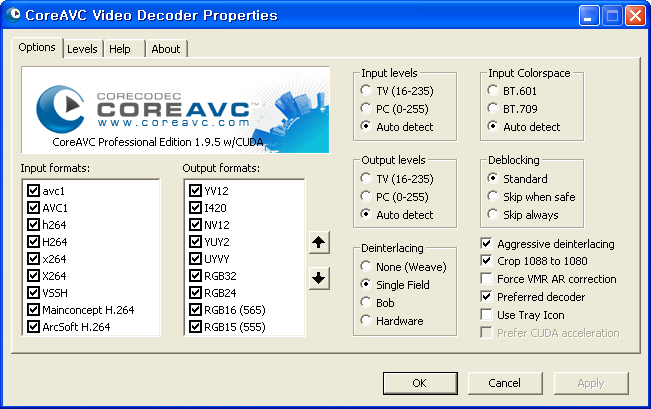
You can get the Full list of CUDA enabled cards here.
I hope this had been some help to you. Post your questions, I`ll be happy to answer them.
loading...
loading...
Hi ,
i like this game very much because it contain all the interesting stages and i love to play this type of games.Thanks for sharing information…
loading...
loading...
i have pentium D 820 (2.8ghz, OCed to 3.1ghz)+2gb of DDR2-800 memory+x1950 pro, and the cpu is not sufficient neither to transcode to ps3 nor to play under Win7,
16gb of such MKV:
Video: MPEG4 Video (H264) 1920×1080 23.98fps [Video]
Audio: Dolby AC3 48000Hz 6ch [Audio]
Text [Subtitle]
Under WinXP, when using CoreAVC it plays flawlessly.
loading...
loading...
i have pentium D 820 (2.8ghz, OCed to 3.1ghz)+2gb of DDR2-800 memory+x1950 pro, and the cpu is not sufficient neither to transcode to ps3 nor to play under Win7,
16gb of such MKV:
Video: MPEG4 Video (H264) 1920×1080 23.98fps [Video]
Audio: Dolby AC3 48000Hz 6ch [Audio]
Text [Subtitle]
Under WinXP, when using CoreAVC it plays flawlessly.
loading...
loading...
Hi!
Nice article. I'm just making HTPC so i need some help. So you're saying that this graphic card isn't good enough?
loading...
loading...
I am wanting to attempt something just a bit different here so please pipe up if you will for your 2 cents. I want a media server (pic's, Video, Dual tuner card, HD movies, music, the whole shebang). I want to run 2 to 3 WD TV Live Media Players (1 per room) to be able to access the media simultaneously. I believe that if any one media file was to be accessed simultaneously it would have to be from the HD recordings from the tuner card (can that even be?). So I don't see the need for a great v-card but for the tuners. Is this setup possible and if so, what is the best way to set this up as far as requirements? Thanks for any suggestions.
loading...
loading...
oh there's a FREE, 10x better, simpler method.
Download “KMPlayer”. Its recommended by most 1080p rippers.
I can now run Full HD, 1080p content butter-smooth on my 1GB, 1.8Ghz Core SOLO laptop(yes, you read that right!).
there's another way…
download “K-Lite mega codec pack”,
open 1080p file on the newly installed “Media Player Classic”,
open “task manager” by pressing ctrl-shift-escape,
In the “Processes” tab, right-click the “mpc” process,
change the “Priority” to “Above Normal”.
Bingo 😀
loading...
loading...
Klite is a good free codec, but it consumes more CPU and video jerks alot. Setting higher priority will literally freezes other apps or make them sluggish. And videos varies within 1080p, a higher bitrate one may not run as smooth. Coreavc always does it optimally, so you save power, extend battery, still run videos smoother. It had been a great investment for me 🙂
loading...
loading...
Oh!I can't download coreAVC 2.0 because it requests to buy it no trial version for me. Can you help me now about this problem?
loading...
loading...
Thank you for your info page,
It save me a lot to build a new PC for just only to see 1080p video.
Using CoreAVC the & my videos play flawlessly.
loading...
loading...
wow! works like a charm with WMPC and CoreAVC.
loading...
loading...
PLEASE HELP ME! I am trying to play a very large (38gb) FullHD 1080p movie (Avatar) but I'm having problems! It is extremely choppy/laggy when I use VLC Media Player. I've tried Windows Media Player but that is even worse! I read the comments and someone mentioned that KMplayer was good and I downloaded it. Well that doesn't even work! When I choose the file to open it opens and plays but the video is extremely tiny! When I set it to full-screen all I see are hues of blu and purple! What player can I use? I have a crappy Dell Vostro, here are the specs:
Intel(R) Core(TM)2 Duo CPU E400 @ 2.20GHz and 1GB of RAM
Please help me!
loading...
loading...
dude get a life or get a good computer like mine i’m not bragging but my system is a core i5 760 2.8 and i oc’d it to 4.2 ha. 8gb ddr3 ram thats 4 2gb 1600 mhz rams.and 2 heavy duty 1gb pci express cards yeah thats right.there is nothing that my monster pc cannot run booya. ok somebody reply to that
loading...
loading...
This is priceless advice, motherfucker!
loading...
loading...
Well, if Snake can download it i guess he should struggle a little with the file. Btw, have 8gb ram myself, a ssd disk, 3.4 X4 and everything runs smooth. Ubuntu with swap (/tmp) on ram rather than disk. Works like a charm! 🙂
In conclution ladies and gentlemen, snake should get a new computer.
loading...
loading...
Man thanks very very much for this article and advice! You helped me a lot! Now I can watch 1080p movies smoothly on my Pentium 3.2 Ghz single core, just because I have installed CoreAVC, its such amazing software! Great job! Recommended to everyone!
loading...
loading...
Hello – is this software available for mac too?
Alex
loading...
loading...
Can you comment on the expansion slot please?
I'm about to buy Zotac GeForce GT220 512MB (PCIe 2.0 x16)
While my motherboard is ASUS P5KPL-AM SE (ONLY SUPPORTS PCIe x16)
The Million Dollar Question is…will it do if the video card only runs at PCIe 1.1 ?
loading...
loading...
Just so you know PCIe x1, x2, x4, x8 and x16 will all work in an x16 port. I’ve used an x1 card in an x16 port and it works fine.
Confirmation: http://en.wikipedia.org/wiki/PCI_Express
loading...
loading...
In the minimum system requirements for CoreAVC, you forgot one thing (which puzzled me for years).
I've got a 3ghz CPU with 256mb of Video Memory.
It was running HD fine until one time when the power shut out, it seems that my BIOS had been reset/reconfigured.
I couldn't watch HD smoothly anymore, it puzzled me, but soon I found out that the system memory's clock speed also plays a crucial role, it should be at least 400mhz above to play it fine, Mine was set to 333mhz when it didn't play well.
loading...
loading...
According to my opinion, codecs bla bla dont work… you may have the least possible specifications to run 1080p as mentiond
3.6ghz pro
512mb Video mem
2.5 gb ram
loading...
loading...
Try again! I have succeeded to have 1080p playback on a system that is from 2003 :
1.7 GHz Pentium M (Banias 1MB L2 Cache)
512 MB Ram (DDR)
CoreAVC is not efficient. I have had much better results using FFDShow and KMPlayer (which has native decoding)
CPU usage is high : 70% for 720p and 90-100% for 1080p, but is plays well
(note this is watching videos with subs – like most of the world does…)
loading...
loading...
My sony bravia lcd tv has a usb port and it is full HD. Is there any way by which I can copy HD movies to usb and then play on bravia. Please answer with details.
loading...
loading...
I have sony bravia lcd tv with a usb port and it is full HD so how can i transfer HD movies to usb and play them on bravia? Please provide as many details as possible.
loading...
loading...
it did not worked
loading...
loading...
it did not worked
loading...
loading...
2mb of ram? lol
loading...
loading...
my machine can’t play this 1080p HD Video, what a pity……
loading...
loading...
I have intel core 2 quad at 2600 with 4 gb of ram and Gainward nVidia GeForce 8400GS, 512Mb. Hopeless.
loading...
loading...
why cant you people try mplayer which comes with all the necessary codecs no need to purchase any codecs…mine is p4 with 3.2ghz pc which never supported 1080p even i tried core avc… but now mplayer a chineese player in english version is playing…this is only to those who cannot afford…
loading...
loading...
why cant you people try mplayer which comes with all the necessary codecs no need to purchase any codecs…mine is p4 with 3.2ghz pc which never supported 1080p even i tried core avc… but now mplayer a chineese player in english version is playing…this is only to those who cannot afford…
loading...
loading...
I can’t find this answer anywhere: What are the minimum requirements for 1080p and 1080i smooth playback using deinterlace and other filters/shaders to improve image quality?
loading...
loading...
Wow, thank you so much! I wasn’t able to play HD movies in Win7, but as soon as I installed this codec, the movies are playing smoothly. Thank you again!
loading...
loading...
Haahaha, man is your OS Windows 95, do you do any multitasking. Your configuration so high
loading...
loading...
Haahaha, man is your OS Windows 95, do you do any multitasking. Your configuration so high
loading...
loading...
Nah, not worked.
loading...
loading...
It plays HD vids very well on my Sempron LE-1300 / Nvidia geforce 8200 but only in Media player classic. In Windows Media Player or VLC it plays very fragmented or not at all.
loading...
loading...
thank you very very much, i have a p4 3.2 nortwood with a hd3650 and i can play 1080p flawless after your advise. My cpu not maxed out since, it takes about 20-30%.. The youtube 1080p is still not possible, but i can download the videos and watch it after. THANK YOU VERY MUCH. AWESOME POST.
loading...
loading...
I hope your not serious.
loading...
loading...
Will 3rd gen core i3 4005u (without any discrete graphics card) run multiple 1080p videos smoothly? And can pentium 3825u and N3540 also do that?
loading...
loading...
i have a laptop
i5 3ghz something
4gb ram
nvidia nvs 3100m
and the video still lags even my processor isn’t using 100%
loading...
loading...
Wow this is the answer i was looking for a long time. thx
loading...
loading...